
Chap2. An Array of Sequences
0x01 Overview of Built-In Sequences
按存储的元素类型来分:
Container sequences
hold items of different types, including nested containers.
list、tuple、collections.deque
Flat sequences
hold items of one simple type
str、bytes、array.array
A container sequence holds reference to the objects it contains, which may be of any type
while a flat sequence stores the value of its contents in its own memory space
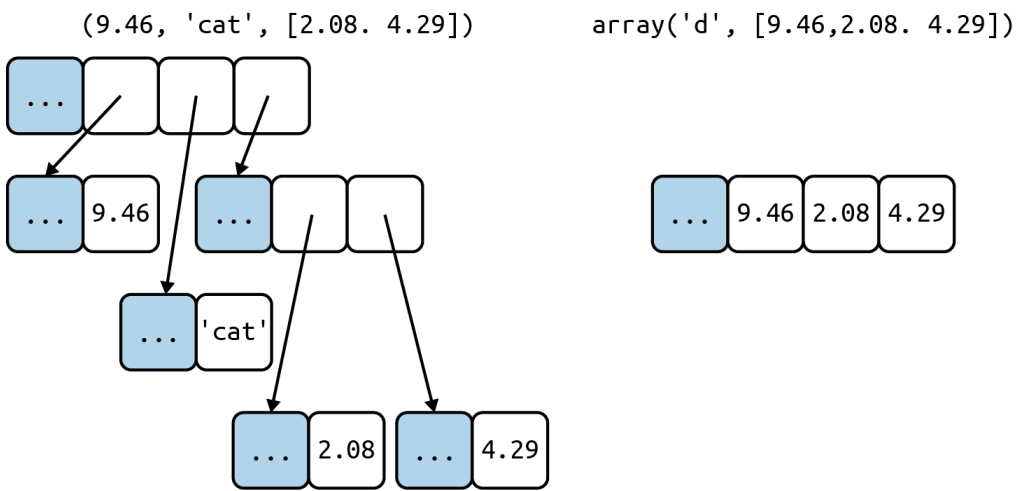
Every Python object in memory has a header with metadata.
Take float for example. It has a value field and two metadata fields
- ob_refcnt: the object’s reference count
- ob_type: a pointer to the object’s type
- ob_fval: a C double holding the value of the float
On a 64-bit Python build, each of those fields takes 8 bytes.
按存储的元素值是否可变来分:
Mutable sequences
list、bytearray、array.array、collections.deque
Immutable sequences
tuple、str、bytes
0x02 List Comprehensions and Generator Expressions
listcomps:列表推导式
genexps:生成器表达式
listcomps
列表推导式提供了一种更优雅的方式来生成列表
1 | symbols = 'ABC' |
1 | symbols = 'ABC' |
listcomps or genexps, both have a local scope to hold the variables assigned in the for clause
However, variables assigned with the “Walrus operator” := remain accessible after those comprehensions or expressions return
2
3
4
5
6
7
codes1 = [ord(x) for x in x]
print(x) # ABC
codes2 = [last := ord(_) for _ in x]
print(last) # 67
print(_) # NameError: name '_' is not defined
- Listcomps VS map and filter
使用map和filter能实现和Listcomps一样的功能,但可读性差多了
1 | symbols = '£¢$¥₣' |
1 | symbols = '£¢$¥₣' |
- cartesian products
利用列表推导式来生成笛卡尔乘积
1 | colors = ['balck', 'white'] |
genexps
A generator expression saves memory because it yields items one by one using the iterator protocol
生成器表达式的语法和列表推导式一样,不过是用圆括号parentheses而不是中括号brackets
1 | import array |
若函数参数只有一个,则传递生成器表达式时不需要加圆括号
当数据量大时建议使用生成器表达式来节省内存空间
1 | colors = ['balck', 'white'] |
0x03 Tuples
Tuple is an immutable container sequence
Tuples do double duty:
- immutable lists 不可变列表
- records with no field names 没有字段名的记录
tuples as records
when using a tuple as a collection of fields, the number of items is usually fixed and their order is always important
1 | coordinates = (39.91, 116.4026) |
In general, using _ as a dummy variable is just a convention.
However, in a match/case statement, _ is a wildcard that matches any value
In the Python console, the result of the preceding command is assigned to _
tuples as immutable lists
相同长度的元组和列表,前者占用的内存空间更少
元组的长度和元素引用不可变
1 | a = (10, 'alpha', [1, 2]) |
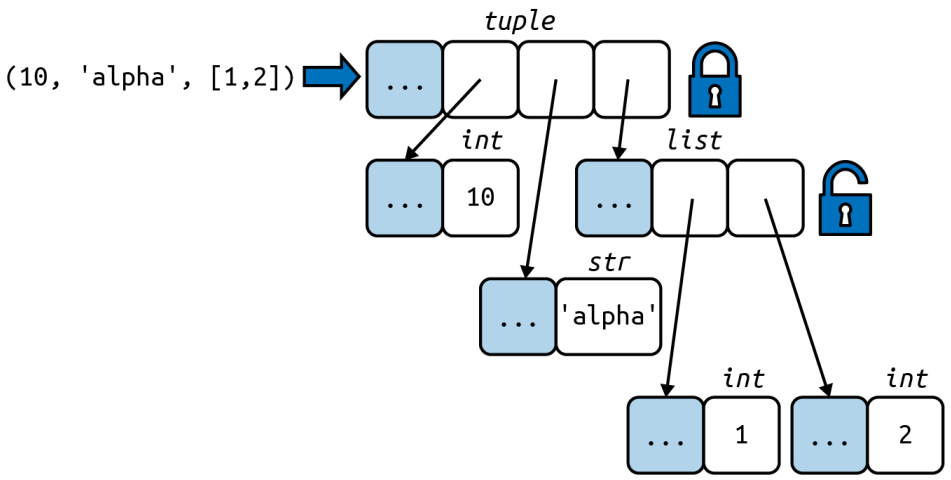
The content of the tuple itself is immutable, but that only means the references held by the tuple will always point to the same object. However, if one of the referenced object is mutable—like a list—its content may change.
注意:元组中的可变元素很可能是导致bug的来源
An object is hashable only if its value cannot ever change
若一个元组里面包含可变元素,则其不能作为字典的键或插入一个集合
可以通过下面代码来判断元组是否有固定值
2
3
4
5
6
7
8
9
10
11
12
try:
hash(o)
except TypeError:
return False
return True
tf = (10, 'alpha', (1, 2))
tm = (10, 'alpha', [1, 2])
is_fixed(tf) # True
is_fixed(tm) # unhashable type: 'list'
0x04 Unpacking Sequences and Iterables
Unpacking avoids unnecessary and error-prone use of indexes to extract elements from sequences.
unpacking used in
- parallel assignment
1 | a, b = (1, 2) |
- swap values
1 | a, b = b, a |
- prefix an argument with * when calling a function
1 | divmod(20, 8) # Return the tuple (x//y, x%y) |
- return multiple values
1 | import os |
定义函数时可以用*args去获取任意多余的参数
1 | def func(a, b, c, d, *rest): |
在并行赋值也可以使用*,并且*可以出现在任意位置
1 | a, b, *rest = range(5) |
定义列表、元组、集合字面量时
1 | [*range(4), 4] # [0, 1, 2, 3, 4] |
嵌套结构
1 | metro_areas = [ |
0x05 Pattern Matching with Sequences
Python 3.10 终于支持switch/case了,不过它叫match/case
它比其他语言的switch/case更强大,因为提供了destructing——a more advanced form of unpacking
1 | metro_areas = [ |
_匹配该位置的单项,但不会绑定该项的值,_可以出现多次
A sequence pattern matches the subject if:
- The subject is a sequence
- The subject and the pattern have the same number of items
- Each corresponding item matches, including nested items
Sequence patterns写成圆括号parentheses或方括号square brackets都一样
对于
str、bytes、bytearray,在match/case下会被认为是单一的值,而不是sequence当需要处理这类数据时,需要先转化为序列对象
2
3
4
5
6
7
8
9
10
match tuple(phone):
case ['1', *rest]:
print(1)
case ['2', *rest]:
print(2)
case ['3', *rest]:
print(3)
case _:
print('default')
也可以在匹配检测类型
1 | case [str(name), _, _, (float(lat), float(lon)]: |
这里并非调用了str、float构造器,而是这个语法会在运行时进行类型检查
另外,若我们想匹配的目标序列以字符串开头,以嵌套的两个浮点数组成的序列结尾,可以使用*_通配
1 | case [str(name), *_, (float(lat), float(lon)]: |
0x06 Slicing
执行seq[start:stop:step]实际上调用的是seq.__getitem__(slice(start, stop, step))
1 | invoice = """ |
0x07 sort or sorted
The list.sort method sorts a list in place——i.e. without making a copy
Python API convention: functions or methods that change an object in place should return None to make it clear to the caller that the receiver was changed and no new object was created.
e.g. random.shuffle(s) returns None
1 | fruits = ['grape', 'raspberry', 'apple', 'banana'] |
0x08 when a list is not the answer
The list type is flexible and easy to use, but depending on specific requirements, there are better options.
Arrays
If a list only contains numbers, array.array is a more efficient replacement.
A python array is as lean as a C array.
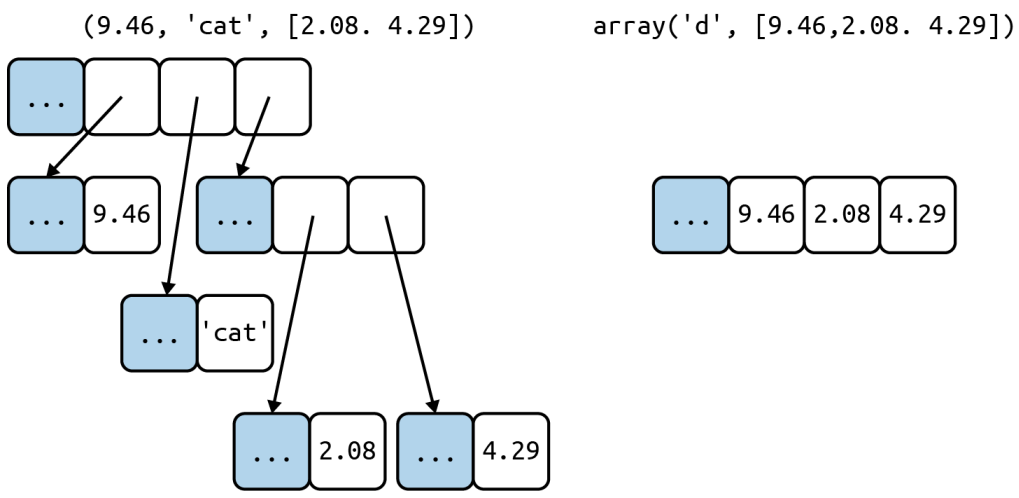
An array of float value does not hold full-fledged float instances, but only the packed bytes representing their matched valued. When creating an array, you provide a typecode, a letter to determine the underlying C type used to store each item in the array.
Arrays support all mutable sequence operations (including .pop, .insert, and .extend), as well as additional methods for fast loading and saving, such as .frombytes and .tofile.
1 | from array import array |
array.tofile and array.fromfile are easy and fast to use.
| Type code | C Type | Python Type | Minimum size in bytes |
|---|---|---|---|
'c' |
char | character | 1 |
'b' |
signed char | int | 1 |
'B' |
unsigned char | int | 1 |
'u' |
Py_UNICODE | Unicode character | 2 |
'h' |
signed short | int | 2 |
'H' |
unsigned short | int | 2 |
'i' |
signed int | int | 2 |
'I' |
unsigned int | long | 2 |
'l' |
signed long | int | 4 |
'L' |
unsigned long | long | 4 |
'f' |
float | float | 4 |
'd' |
double | float | 8 |
Memory Views
The built-in memoryview class is a shared-memory sequence type that lets you handle slices of arrays without copying bytes. It was inspired by the NumPy library.
Using notation similar to the array module, the memoryview.cast method lets you change the way multiple bytes are read or written as units without moving bits around.
1 | from array import array |
Numpy
pass
Deques
Inserting and removing from the head of a list (the 0-index end) is costly because the entire list must be shifted in memory.
The class collections.deque is a thread-safe double-ended queue designed for fast inserting and removing from both ends.
If a bounded deque is full, when you add a new item, it discards an item from the opposite end.
1 | from collections import deque |